📦 Delivery Updates Management / إدارة تحديثات التسليم
Track and manage unit status updates throughout construction and delivery process / تتبع وإدارة تحديثات حالة الوحدات طوال عملية البناء والتسليم
📋 Overview
The Delivery Updates section is specifically designed for tracking and managing unit status updates throughout the construction and delivery process. This essential feature ensures complete transparency between the development team and clients regarding the progress of their property units.
📋 نظرة عامة
قسم تحديثات التسليم مصمم خصيصًا لتتبع وإدارة تحديثات حالة الوحدات طوال عملية البناء والتسليم. تضمن هذه الميزة الشفافية الكاملة بين فريق التطوير والعملاء بخصوص تقدم وحداتهم العقارية.
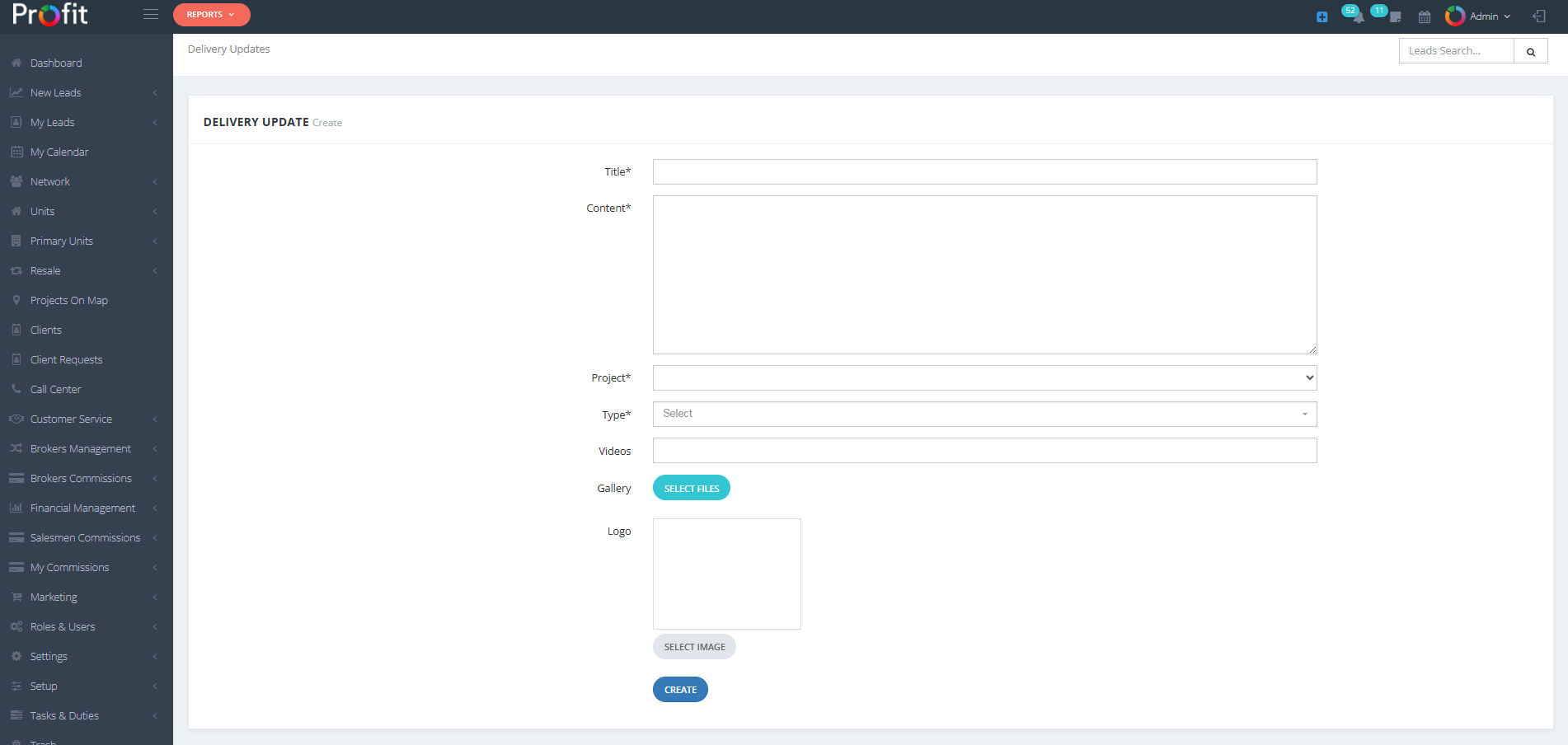
Delivery Updates Interface
واجهة تحديثات التسليم
🔧 Core Management Features
🔧 الميزات الأساسية للإدارة
📊 Unit Status Management
Every time the development team receives an update about a unit's progress, it is recorded as a "Delivery Update." This systematic approach ensures that all construction milestones, completions, and progress updates are properly documented and accessible to clients.
📊 إدارة حالة الوحدة
في كل مرة يتلقى فيها فريق التطوير تحديثًا حول تقدم وحدة ما، يتم تسجيله كتحديث تسليم. يضمن هذا النهج المنهجي توثيق جميع مراحل البناء والإنجازات والتحديثات بشكل صحيح وإتاحتها للعملاء.
When the kitchen finishing work is completed in a unit, the team enters this information as a delivery update. This allows the client to see exactly what has been accomplished in their unit, track progress against the agreed timeline, and stay informed about the development status.
عند الانتهاء من أعمال تشطيب المطبخ في وحدة ما، يقوم الفريق بإدخال هذه المعلومة كتحديث تسليم. يتيح ذلك للعميل معرفة ما تم إنجازه بالضبط في وحدته، وتتبع التقدم مقارنة بالجدول الزمني المتفق عليه، والبقاء على اطلاع بحالة التطوير.
All delivery updates are visible in the unit's record, ensuring clients can monitor what is happening with their property and how the construction is progressing according to the agreed schedule and specifications.
جميع تحديثات التسليم تظهر في سجل الوحدة، مما يضمن أن العملاء يمكنهم متابعة ما يحدث في ممتلكاتهم وكيفية تقدم البناء وفقًا للجدول والمواصفات المتفق عليها.
📝 Creating Delivery Updates
📝 إنشاء تحديثات التسليم
When you click the "ADD AN UPDATE" button, a form opens that allows you to register the new delivery update with the following required information:
عند الضغط على زر "إضافة تحديث"، يظهر نموذج يسمح لك بتسجيل التحديث الجديد مع المعلومات المطلوبة التالية:
📋 Essential Update Information
📝 Title* (Required)
Write a clear, descriptive title for the update that summarizes what was completed or the milestone achieved.
📄 Content* (Required)
Provide complete details about the update, including specific work completed, materials used, quality standards met, and any relevant notes about the progress.
📋 معلومات التحديث الأساسية
📝 العنوان* (إجباري)
اكتب عنوانًا واضحًا ووصفيًا للتحديث يلخص ما تم إنجازه أو المرحلة التي تم تحقيقها.
📄 المحتوى* (إجباري)
قدم تفاصيل كاملة حول التحديث، بما في ذلك الأعمال المنجزة، المواد المستخدمة، معايير الجودة المحققة، وأي ملاحظات ذات صلة بالتقدم.
🏗️ Project* (Required)
Select the specific project to which this update belongs, ensuring proper categorization and tracking.
🏷️ Type* (Required)
Choose from the available update types that have been configured by your system administrator. These categories help organize different kinds of updates and ensure consistent reporting.
🏗️ المشروع* (إجباري)
اختر المشروع المحدد الذي ينتمي إليه هذا التحديث لضمان التصنيف والتتبع الصحيح.
🏷️ النوع* (إجباري)
اختر من أنواع التحديثات المتاحة التي قام مسؤول النظام بتكوينها. تساعد هذه الفئات في تنظيم أنواع التحديثات المختلفة وضمان تقارير متسقة.
📸 Visual Documentation
🎥 Videos
Upload video files that showcase the completed work, progress footage, or detailed explanations of the updates. Videos provide dynamic documentation of the construction progress.
🖼️ Gallery
Upload photos and images related to the update. Visual documentation helps clients see the actual progress and quality of work completed in their units.
📸 التوثيق المرئي
🎥 الفيديوهات
ارفع ملفات فيديو توضح الأعمال المنجزة أو لقطات التقدم أو شروحات تفصيلية للتحديثات. توفر الفيديوهات توثيقًا ديناميكيًا لتقدم البناء.
🖼️ المعرض
ارفع صورًا ولقطات متعلقة بالتحديث. يساعد التوثيق المرئي العملاء على رؤية التقدم الفعلي وجودة الأعمال المنجزة في وحداتهم.
- Provide detailed, specific information in both title and content fields
- Include high-quality photos and videos to document progress visually
- Update regularly to maintain client confidence and transparency
- Use consistent terminology and formatting for professional presentation
- Ensure all updates align with the agreed project timeline and specifications
- قدم معلومات مفصلة ومحددة في حقول العنوان والمحتوى
- قم بتضمين صور وفيديوهات عالية الجودة لتوثيق التقدم بصريًا
- قم بالتحديث بانتظام للحفاظ على ثقة العميل والشفافية
- استخدم مصطلحات وتنسيقات متسقة لتقديم عرض احترافي
- تأكد من أن جميع التحديثات تتماشى مع الجدول الزمني والمواصفات المتفق عليها للمشروع
This delivery update system ensures that clients stay informed about their property's progress, builds trust through transparency, and allows them to track development according to the agreed schedule, ultimately leading to higher client satisfaction and confidence in the development process.
يضمن نظام تحديثات التسليم هذا أن يظل العملاء على اطلاع بتقدم ممتلكاتهم، ويبني الثقة من خلال الشفافية، ويسمح لهم بتتبع التطوير وفقًا للجدول الزمني المتفق عليه، مما يؤدي في النهاية إلى زيادة رضا العملاء وثقتهم في عملية التطوير.